Artificial Intelligence is rapidly transforming the way we work, create, and interact with technology. One of Google’s newest innovations, the Google Nano Banana, has been making headlines as part of its Gemini AI ecosystem. But what exactly is this oddly named feature, and why is it attracting so much attention in 2025?
Let’s dive deep into what Google Nano Banana is, how it works, its features, pros and cons, and whether it’s the future of AI-powered photo editing.
What is Google Nano Banana?
The Google Nano Banana is an AI-powered image editing tool integrated into Google’s Gemini app. Despite its quirky name, it’s one of the most advanced and user-friendly AI photo editing systems available today.
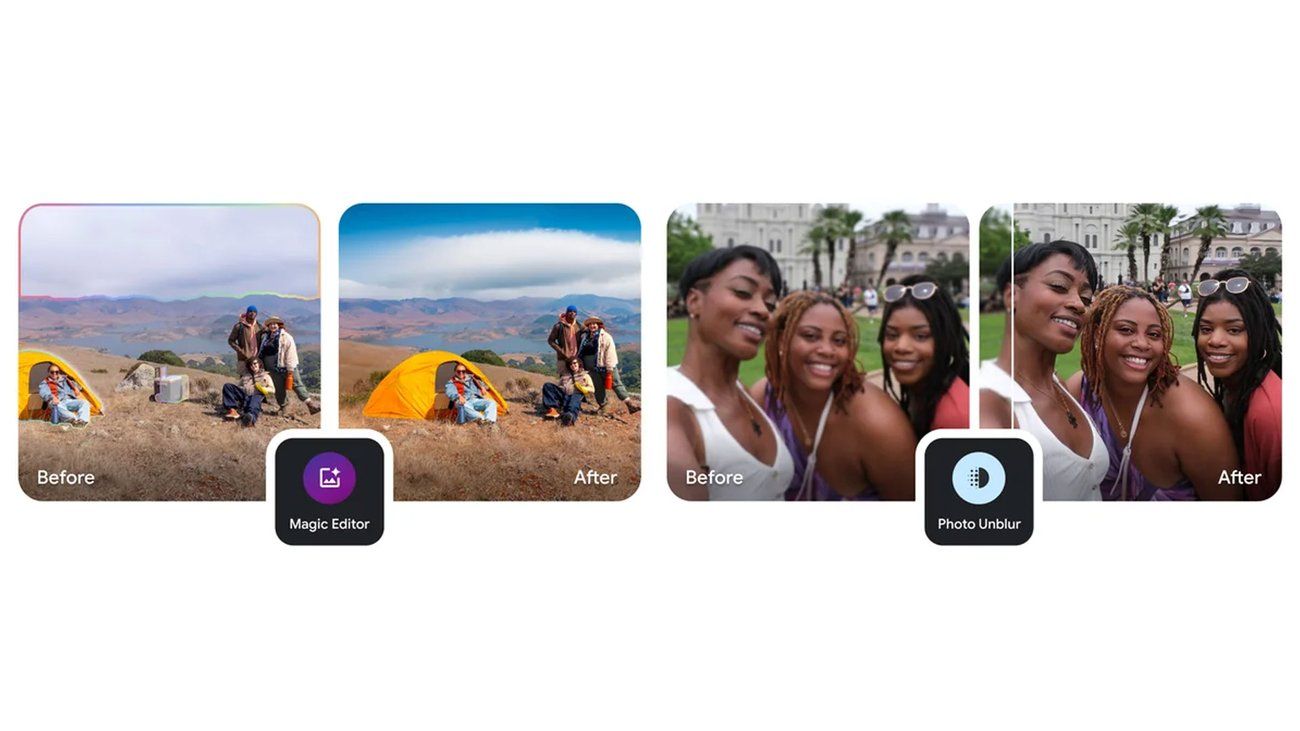
At its core, Nano Banana allows users to edit photos with just a few taps. From removing unwanted objects to changing entire backgrounds, the tool is designed for both casual users and content creators who want professional-looking results without spending hours in complex editing software.
The Concept Behind Nano Banana
The unusual name “Nano Banana” has sparked curiosity among tech enthusiasts, but behind the playful branding lies a serious idea. Google wanted to make AI-powered photo editing feel friendly, fun, and approachable rather than intimidating. Instead of a technical or complex name, “Nano Banana” reflects Google’s long tradition of blending innovation with creativity.
The term “Nano” represents precision and small-scale enhancements, highlighting how the tool can fine-tune even the tiniest details in an image. “Banana,” on the other hand, is a lighthearted touch — a reminder that AI doesn’t have to feel robotic or overly technical. Together, the name signals Google’s mission: to bring powerful, professional-grade editing tools into the hands of everyday users in a way that feels simple and even a little playful.
In short, the concept behind Nano Banana is to democratize AI editing, making it accessible not only for graphic designers and photographers but also for students, marketers, and anyone who wants to improve their photos with ease.
How It Works Within the Gemini App
Using Nano Banana inside the Gemini app is designed to feel as natural as chatting with a friend. Once you open Gemini, you can either upload a photo or capture one directly through the app. From there, you simply type or speak a command such as:
-
Remove the person in the background.
-
Change the sky to a sunset.
-
Make this image look like a painting.
The AI instantly processes the request and generates the edited version in seconds. What makes Nano Banana powerful is that it doesn’t just apply filters — it understands the context of the image. For example, if you ask it to brighten a face, it enhances skin tones while keeping the background natural, rather than overexposing the entire photo.
Another highlight is non-destructive editing. Instead of permanently altering your image, Nano Banana creates a version that you can tweak further, undo, or refine with additional prompts. This flexibility makes it useful for both quick edits and professional-grade adjustments.
Because it’s part of Gemini, Nano Banana also benefits from Google’s AI ecosystem — meaning it can combine image editing with text-based features like captions, content generation, or even search-powered insights. For instance, after editing, you can ask Gemini to suggest a caption, create a matching graphic, or optimize the image for social media platforms.
In short, Nano Banana works seamlessly within Gemini, acting like a smart assistant for your photos, blending creativity with practicality.
Key Features of Google Nano Banana
Google Nano Banana stands out because of its blend of simplicity and powerful AI capabilities.
AI-Powered Image Editing
It uses Google’s advanced machine learning algorithms to understand objects, lighting, and textures in photos, allowing edits that look natural.
Smart Object Removal & Background Replacement
Tired of photobombers or messy backgrounds? Nano Banana can remove objects seamlessly and replace backgrounds with realistic alternatives.
Realistic Enhancements and Touch-ups
The tool can sharpen images, fix lighting issues, and even enhance facial details — making portraits look professional without filters.
Pros and Cons of Google Nano Banana
Like every AI tool, Nano Banana has strengths and weaknesses.
Advantages
-
Easy to use – no editing expertise required.
-
Seamless edits that look natural and professional.
-
Integrated into Gemini app, so no need for third-party software.
-
Free for most users, unlike premium editing apps.
-
Perfect for social media creators, businesses, and casual users.
Limitations
-
Currently limited to Gemini-supported devices.
-
May struggle with very complex edits compared to Adobe Photoshop.
-
Data privacy concerns, as images are processed through Google servers.
-
Still rolling out globally, so not everyone has access yet.
How Google Nano Banana Compares to Other AI Tools
Google isn’t the first to explore AI photo editing, but Nano Banana has unique strengths.
| Feature / Tool | Google Nano Banana (Gemini App) | Adobe Photoshop Generative Fill | Canva AI (Magic Edit & Magic Media) | Fotor AI / Other Free Tools |
|---|---|---|---|---|
| Ease of Use | Very simple – works through chat or prompts, no design skills needed | Requires some photo-editing knowledge | Beginner-friendly drag & drop editing | Very easy, but limited features |
| AI Editing Power | Context-aware edits (e.g., object removal, sky replacement, style changes) | Advanced, professional-grade AI edits | Good for quick edits and social content | Basic edits only |
| Integration | Built into Google Gemini app – can combine text + image tasks | Works in Photoshop (subscription required) | Integrated into Canva (web + mobile) | Standalone, mostly free online tool |
| Speed | Fast, near-instant edits | Fast but may depend on file size | Fast, optimized for quick social use | Moderate speed, depends on internet |
| Output Quality | Natural-looking results, optimized for general users | Industry-leading, best for professionals | Great for social media visuals | Decent, but less refined |
| Extra Features | Works with text prompts, captions, content generation | Deep editing, layer control, precise tools | Templates, brand kits, social media resizing | Mostly just photo AI filters |
| Pricing | Likely free/low-cost within Gemini (part of Google ecosystem) | Premium (Adobe Creative Cloud subscription) | Freemium – free plan + paid upgrades | Mostly free, premium unlocks more |
| Best For | Everyday users, creators, and anyone using Google services | Designers, photographers, professional editors | Content creators, marketers, social media managers | Casual users who want free edits |
Real-World Applications of Google Nano Banana
This tool isn’t just a tech demo — it has real impact across industries.
For Content Creators
Influencers and YouTubers can quickly edit thumbnails, portraits, and product photos without hiring editors.
For Businesses and Marketing
Companies can use it to create polished marketing visuals, social media campaigns, and product images at a fraction of the cost.
For Personal Use
Everyday users can enhance travel photos, fix group shots, and even create fun edits for sharing with friends.
Availability and Supported Devices
As of 2025, Google Nano Banana is available on select devices through the Gemini app.
Phones That Support Google Nano Banana
Currently, Google Pixel devices and a few flagship Android smartphones support it. Wider rollout is expected later this year.
When Will It Roll Out Globally?
Google plans to expand Nano Banana to more regions and devices by late 2025, making it a standard feature in AI photo editing.
Future of AI Image Editing With Google Nano Banana
The launch of Nano Banana signals a future where AI photo editing becomes as common as using a camera filter. As AI models improve, we can expect features like 4K editing, HDR adjustments, and even real-time video edits directly from our smartphones.
Final Thoughts – Is Google Nano Banana Worth It?
The Google Nano Banana may sound playful, but it’s a serious leap in AI-powered editing. It makes professional-quality photo editing simple, fast, and accessible to everyone.
-
If you’re a content creator, it’s a must-have tool.
-
If you’re a casual user, it makes editing fun and effortless.
-
For businesses, it cuts costs and speeds up creative workflows.
In short, Google Nano Banana is one of the most exciting AI tools of 2025 — and it’s only going to get better.